The Ultimate Guide to Redeem Your Reward from Polymarket by Using Script
Claim your rewards easily
Every day in the Polymarket Discord #Dev Group, someone asks the same question:
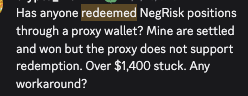
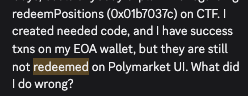
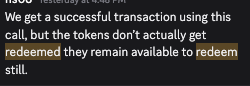
You won your bet.
The market resolved in your bet
But your USDC rewards is stuck on-chain, locked inside outcome tokens that nobody told you how to convert back to your wallet .
This guide fixe that , and permanently!
By the end, you'll have a full script that can redeem your every ended position to your wallet with a several script .
1. What Is Redemption and Why Doesn't It Happen Automatically?
When you bought "YES" on Polymarket, you're not placing a bet in the traditional sense.
You're purchasing an ERC-1155 token on Polygon blockchain network ,and this EIP1155 token represents your position.
So after the market resolves:
- Winning tokens are worth $1.00 each
- Losing tokens are worth $0.00

But here's the thing: **resolution does not send money to your wallet automatically **
Your winning tokens still sit in your address.
You need to call a smart contract function — redeemPositions — to burn those tokens and receive USDC in return.
You can think of it like a lottery ticket, or the staking mechanism.
The drawing happened.and our the result revealed .
But you still have to walk to the store , have to go the protocl
and say
* Hi, can you help me burn to tikct , and give me the winnr price ?
* Hey, can you exchange from my share token , to my underlying token ?
So the redemption is that exchange procedure .
Paired Redemption
Actually there's a second type of redemption most people don't know about.
If you hold both Yes and No tokens from the same market, you can merge them back into USDC token regardless of who won.
The underlying logic is
1 USDC = 1 YES + 1 NO

so

1YES + 1NO  = 1 USDC
Take an example:
You hold 100 Yes tokens and 80 No tokens. You can:
-
Merge 80 pairs (80 Yes + 80 No) → $80 USDC
-
Redeem the remaining 20 Yes tokens
-
$20 USDC back to (if Yes won)
-
$0 USDC back to (if No won, sadly , bad choice )
-
2. The Complete Script Redemption Lifecycle
Before writing any code, we can understand what has to happen inside .
Every successful redemption follows these six steps:
1/ Auth → Prove you own the wallet, and connect to CLOB API
2/ Get Positions → Query all tokens you hold
3/ Filter → Find which positions are settled and redeemable
4/ Pack Redeem TX → Build the correct contract call
5/Send TX → Submit to Polygon (pay gas or use gasless relayer)
6/ Confirm Result → Verify Tx receipt and USDC arrived in your wallet
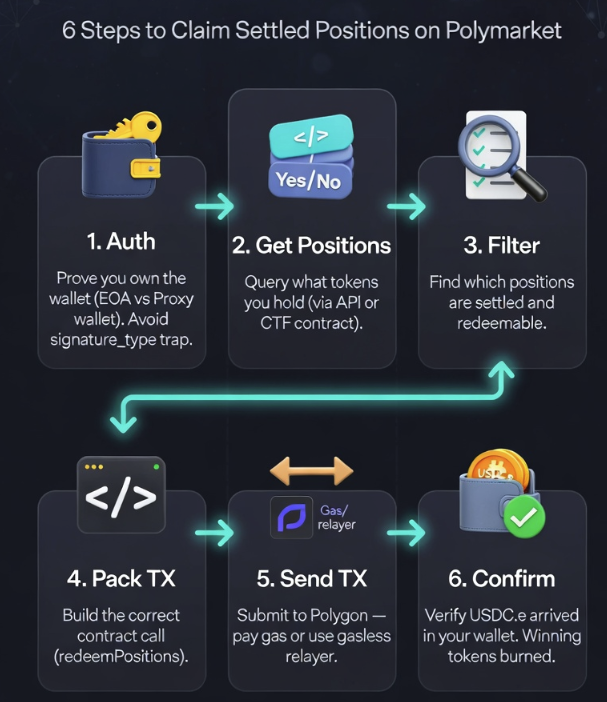
Let's walk through the details step by step , including the traps that catch most people.
2.1 Step 1: Authentication
You need your wallet's private key to sign the redemption transaction.
If you're using Polymarket's relayer (gasless), you also need API credentials.
There are three wallet types exist on Polymarket:
| Type                | signature_type | How to tell                          |
| ------------------- | -------------- | ------------------------------------ |
| EOA (MetaMask)      | 0              | You deposited directly from MetaMask |
| Proxy (Email/Magic) | 1              | You signed up with email             |
| Safe Proxy Wallet   | 2              | You signed with safe wallet          |
enum SignatureType {
    /* ECDSA EIP712 signatures signed by EOAs*/
    EOA = 0,
    /* EIP712 signatures signed by EOAs that own Polymarket Proxy wallets */
    POLY_PROXY = 1,
    /* EIP712 signatures signed by EOAs that own Polymarket Gnosis safes*/
    POLY_GNOSIS_SAFE = 2
}
Common trap:
Using signature_type =2 when your wallet to create a Proxy wallet .
The transaction will silently fail. If you created your account via email or the Polymarket website, you almost certainly have a proxy wallet.
Your signing key and your funder(operator on Polymarket) address are different — you need to specify the funder address separately.
2.2 Step 2: Get Your Positions
The next is to query your Polymarket Data by using api after authorization .
GET https://data-api.polymarket.com/positions?user={your_wallet_address}

refer : (https://docs.polymarket.com/api-reference/core/get-current-positions-for-a-user)
This returns all your positions — open, closed, settled, everything.
Each position includes:
conditionId— identifies the trade marketsize— how many tokens you holdredeemable— whether the market is redeemablecurPrice— current token price (1.0 = won, 0.0 = lost)negativeRisk— whether this is a negative risk market
[
  {
    "proxyWallet": "0x56687bf447db6ffa42ffe2204a05edaa20f55839",
    "asset": "<string>",
    "conditionId": "0xdd22472e552920b8438158ea7238bfadfa4f736aa4cee91a6b86c39ead110917",
    "size": 123,
    "avgPrice": 123,
    "initialValue": 123,
    "currentValue": 123,
    "cashPnl": 123,
    "percentPnl": 123,
    "totalBought": 123,
    "realizedPnl": 123,
    "percentRealizedPnl": 123,
    "curPrice": 123,
    "redeemable": true,
    "mergeable": true,
    "title": "<string>",
    "slug": "<string>",
    "icon": "<string>",
    "eventSlug": "<string>",
    "outcome": "<string>",
    "outcomeIndex": 123,
    "oppositeOutcome": "<string>",
    "oppositeAsset": "<string>",
    "endDate": "<string>",
    "negativeRisk": true
  }
]
2.3 Step 3: Filter for Redeemable Positions
A position is redeemable when:
redeemable = true(market has resolved)size > 0(you still hold tokens)- You haven't already redeemed it
Simple filter:
redeemable = [p for p in positions if p['settled'] and float(p['size']) > 0]
means, iterate all your position , check whether it is settled , and you have the position ,and yeah , we also should claim the position even the bet is lost .
2.4 Step 4: Pack the Transaction( Most important) — This Is Where Most People Fail
Polymarket has two different exchange contracts.
You must call the right one:
- Regular market (neg_risk = false):
Contract: CTF Exchange
Address:  0x4bfb41d5b3570defd03c39a9a4d8de6bd8b8982e

https://polygonscan.com/address/0x4bfb41d5b3570defd03c39a9a4d8de6bd8b8982e#code#F23#L63

/// @dev This function redeems a CTF ERC1155 token for the underlying collateral
/// @param collateralToken The address of the positions' backing collateral token.
/// @param parentCollectionId The ID of the outcome collections common to the position
/// @param conditionId The ID of the condition to split on.
/// @param indexSets Index sets of the outcome collection to combine with the parent outcome collection

function redeemPositions(
        IERC20 collateralToken,
        bytes32 parentCollectionId,
        bytes32 conditionId,
        uint256[] calldata indexSets
    ) external;
-
Negative risk markets (neg_risk = true):
Contract: NegRisk Adapter
Address:  0xd91E80cF2E7be2e162c6513ceD06f1dD0dA35296
function redeemPositions(bytes32 _conditionId, uint256[] calldata _amounts) public
check the difference:
NegRisk Adapter has no
collateralTokenorparentCollectionIdparameters.If you pass the wrong number of parameters, the transaction will reverts.
If you call the wrong contract, the transaction succeeds but nothing happens — your tokens don't move.
This is the #1 reason people say "my redeem transaction succeeded but nothing changed."
They called CTF Exchange for a neg-risk market, or vice versa.
2.5 Step 5: Send the Transaction
The #2 reason is confusing proxy and EOA Wallets
There are Three options, can send this tx
-
Polymarket Relayer (gasless)
Send the transaction through Polymarket's relayer infrastructure.
Polymarket help you pay the gas.
But this requires a Builder API keys and also as a daily quota limit.
429 error -
Direct on-chain (pay gas)
Send the transaction directly to Polygon.
Costs ~0.02 POL per redeem. You need POL in your EOA sender wallet for gas.
-
Batch
Pack multiple redeem transactions into a single call, execute all of this calldata within a single transaction.
This is the best approach if you have many positions.
2.6 Step 6: Confirm
After the transaction is mined on Polygon (usually 2-5 seconds), your USDC balance will increase.
You can verify by
- Check your Polymarket portfolio
- Checking your USDC balance of proxy wallet PolygonScan
- Check the TX receipt if using
Direct on-chainway
3. The Rust Way — One Command to Redeem Everything
I built rs-builder-relayer-client to handle all six steps in a single command .
It's the Rust equivalent of Polymarket's official Python and TypeScript builder-relayer SDKs,
3.1 Installation
Use this method to install all the dependencies required for writing your Rust scripts.
cargo add rs-builder-relayer-client ethers tokio --features tokio/full
cargo add anyhow dotenvy hex
3.2 First Example
use polymarket_relayer::{AuthMethod, RelayClient, RelayerTxType, operations};

#[tokio::main]
async fn main() -> anyhow::Result<()> {
    dotenvy::dotenv().ok();

    let wallet = std::env::var("PRIVATE_KEY")?.parse()?;
    let client = RelayClient::new(
        137,
        wallet,
        AuthMethod::builder(
            &std::env::var("BUILDER_KEY")?,
            &std::env::var("BUILDER_SECRET")?,
            &std::env::var("BUILDER_PASSPHRASE")?,
        ),
        RelayerTxType::Safe,
    ).await?;

    let condition_id_hex = std::env::var("CONDITION_ID")?;
    let condition_id_bytes = hex::decode(condition_id_hex.trim_start_matches("0x"))?;
    let mut cid = [0u8; 32];
    cid.copy_from_slice(&condition_id_bytes);

    let tx = operations::redeem_regular(cid, &[1, 2]);
    let result = client.execute(vec![tx], "Redeem").await?.wait().await?;
    println!("Transaction Hash: {:?}", result.tx_hash);

    Ok(())
}
3.3 Run the build-in exmaple
If you don't want to write any code:
git clone https://github.com/OrderBookTrade/rs-builder-relayer-client
cd rs-builder-relayer-client
cp .env.example .env
# Fill in your keys in .env
# Dry run first (shows what would be redeemed)
cargo run --example redeem_all

# Actually execute
cargo run --example redeem_all -- --execute
Output
Output:
Scanning positions for 0xE512...2e19...
Found 12 settled positions (8 regular, 4 neg-risk)

[1/12] BTC Up or Down - April 5, 8:10PM  | Won  | 7.0 shares | +$7.00
[2/12] BTC Up or Down - April 5, 8:15PM  | Won  | 7.0 shares | +$7.00
[3/12] BTC Up or Down - April 5, 8:20PM  | Lost | 5.0 shares | +$0.00
...
Batching 12 redeems into 1 transaction...
✅ Redeemed | tx: 0xab12...cd34 | +$52.00 USDC.e
4. How to use python / TypeScript to redeem all your position
Below is some pseudo-code that you can use to design your full code
- Here is the Python Way
def encode_redeem_calldata(condition_id: str) -> bytes:
    """Encode redeemPositions(address,bytes32,bytes32,uint256[]) calldata."""
    cid = condition_id[2:] if condition_id.startswith("0x") else condition_id
    condition_bytes = bytes.fromhex(cid).rjust(32, b"\x00")
    args = encode(
        ["address", "bytes32", "bytes32", "uint256[]"],
        [USDC_E, PARENT_COLLECTION_ID, condition_bytes, INDEX_SETS],
    )
    return REDEEM_SELECTOR + args
#1.Auth
clob = ClobClient(
    "https://clob.polymarket.com",
    key=os.getenv("PK"),
    chain_id=137,
    signature_type=1,
    funder=os.getenv("FUNDER")
)
clob.set_api_creds(clob.create_or_derive_api_creds())

# 2. Get settled positions
resp = requests.get(
    "https://data-api.polymarket.com/positions",
    params={"user": os.getenv("FUNDER"), "sizeThreshold": 0}
)
positions = [p for p in resp.json() if p.get("settled") and float(p.get("size", 0)) > 0]

#3.Redeem each one
relayer = RelayerClient(
    os.getenv("RELAYER_URL"),
    int(os.getenv("CHAIN_ID")),
    os.getenv("PK"),
    builder_api_key=os.getenv("BUILDER_API_KEY"),
    builder_secret=os.getenv("BUILDER_SECRET"),
    builder_pass_phrase=os.getenv("BUILDER_PASS_PHRASE"),
)

for pos in positions:
    condition_id = pos["conditionId"]
    # 4. pack TX
    tx = relayer.encode_redeem_calldata(condition_id, [1, 2])
    # 5. send TX
    result = relayer.execute([tx])
    # 6. check the result
    print(f"Redeemed {pos.get('title', condition_id[:10])} | tx: {result}")
- And also the Typescipt Method is same
5. How to Integrate Redemption into Your Trading Bot
If you're running a bot on Polymarket's 5-minute or 15-minute crypto markets
positions settle every few minutes
Manual redemption is impossible.
Here's how to automate it by using rust 🦀 way
// In your bot's main loop
if window_settled {
    let positions = client.get_settled_positions().await?;
    if !positions.is_empty() {
       let tx = operations::redeem_regular(cid, &[1, 2]);
       client.execute(vec![tx], "Redeem").await?.wait().await?;
    }
}
6. Troubleshooting
Relayer returns 429 / quota exhausted
You've hit the daily gasless transaction limit.
Options:
- Batch your redeems (1 call instead of N)
- Wait 24 hours for quota reset
- Fall back to direct on-chain execution (costs ~0.02 POL per tx)
The Rust SDK handles this automatically with DirectExecutor fallback.
What about fee_rate_bps?
Redemption does not involve trading fees.
fee_rate_bps is only relevant when placing orders on the CLOB.
You can ignore it for redeem operations.
Can I redeem someone else's positions?
No.
The redeemPositions function burns tokens from the caller's address.
You can only redeem positions held by the wallet you're signing with.
Having trouble? Open an issue on GitHub or find me in the Polymarket Discord #devs channel.
If this guide saved you time, consider supporting development:
Ethereum / Polygon: 0xF4c6635dFfB53f21c500c1604EC284f8A8a7150D